


My Honest Tungsten Power PDF Review 2026
If you are looking for a PDF editor for your business, you probably heard about Tungsten Power PDF (formerly Kofax Power PDF). It is a complete platform to edit, read, annotate, sign, and manage your PDF files.
But is it worth its price?
Stay here, because in this brutally honest Tungsten Power PDF review, I will break down its key features, pricing, strengths, and limitations to help you decide if this is the PDF editor you are looking for or if it’s better to skip it.
Let’s dive in!
Verdict
Here’s the quick verdict if you don’t want to read the full review:
🎯 Best for: One of the most powerful PDF editors primarily designed for enterprises
🚫 Not ideal for: Lightweight users
⭐ Biggest strength: Robust PDF editing features
⚠️ Biggest weakness: If you upgrade from Standard to Advanced, you need to pay the full amount
⚖️ Verdict: A robust, enterprise-grade PDF editor with strong security and editing capabilities, but not the best choice for regular users
🏆 Score: 4.2 / 5
✅ Tested with our review & scoring methodology ✅ Real-world testing ✅ Unbiased evaluation
Tungsten Power PDF
Summary
Tungsten Power PDF (formerly Kofax Power PDF) is a PDF editor and document management platform designed mainly for enterprises, but ideal for individuals and small-sized businesses as well. It has a Microsoft Office-style user interface that works on Windows and Mac. Overall, I found Tungsten Power PDF is a robust and advanced PDF editor. If you are looking for a cheaper Adobe Acrobat alternative with a powerful feature set, it can be an ideal choice.
|
|
Outstanding PDF password protection and redaction tools
|
|
|
Advanced PDF editing and reading features
|
|
|
Relatively short learning curve
|
|
|
Offers digital signatures for your PDF files
|
|
|
Provides many annotation tools with customization options
|
|
|
If you upgrade from Standard to Advanced, you need to pay the full amount
|
|
|
It is not available on Linux
|
|
|
Negative user reports about customer service
|
|
|
No free version
|
How We Test PDF Editors
To keep our reviews and final scores fair and consistent, we evaluate every PDF editor using a standardized testing framework built on over 3 years of hands-on experience testing these tools in real-world scenarios.
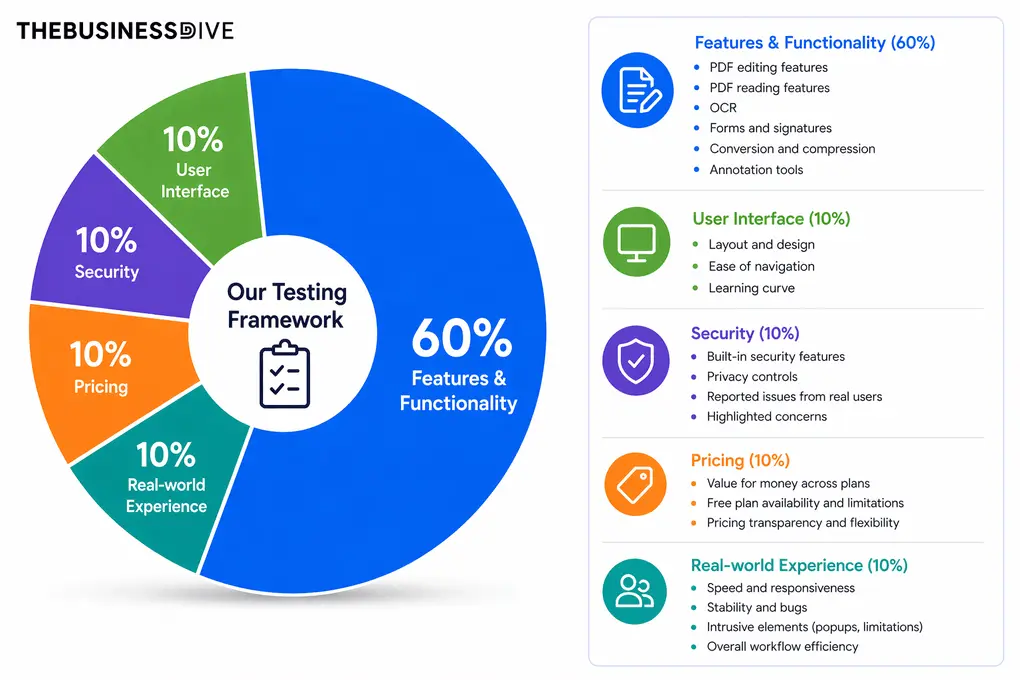
Our scoring breakdown after testing 30+ PDF editors:
🛠️ Features & functionality — 60%
🖥️ User interface — 10%
🔐 Security — 10%
💰 Pricing — 10%
👥 Real-world experience — 10%
Want a detailed breakdown of how we test each category?
Learn exactly how we test tools → Review methodology
Short on time? Here’s a quick overview of Tungsten Power PDF
What is Tungsten Power PDF?
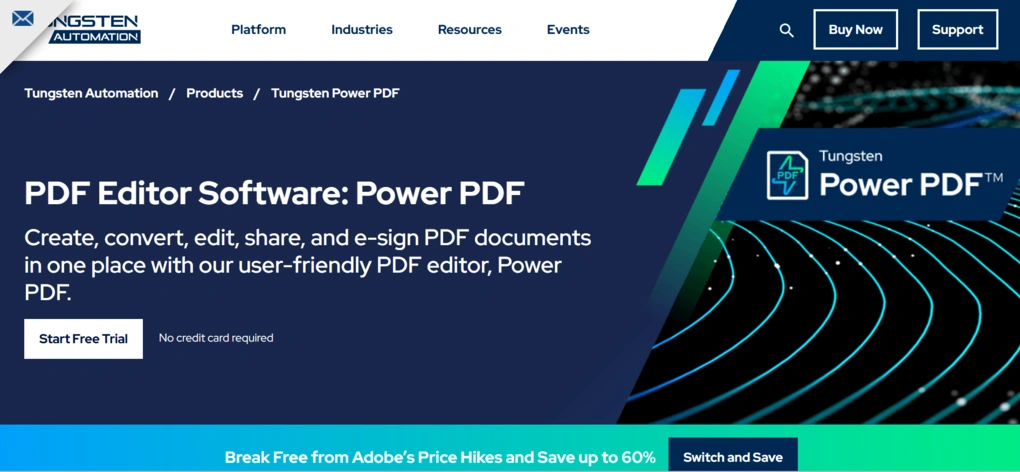
Tungsten Power PDF (formerly Kofax Power PDF) is a PDF editor and document management platform designed mainly for enterprises, but ideal for individuals and small-sized businesses as well.
Tungsten Power PDF, developed by Tungsten Automation, offers robust security, reading, and editing features for your PDF files. It has a Microsoft Office-style user interface that works on Windows and Mac.
If you are a Linux user, you can access its functionality through the Power PDF Cloud Editor in a web browser.
Scroll down to see how Tungsten Power PDF performed during my testing!
What I learned using Tungsten Power PDF over time
During my Tungsten Power PDF review, I used the desktop version on Windows. My overall experience was positive.
Honestly, I did not expect that it would have such powerful PDF management features. It has outstanding PDF security and protection features, and offers all the necessary annotation tools for teams.
In terms of feature set, I did not find any issues or miss any tools for my PDF tasks. Generally, it performed well and did not experience any crashes.
While it offers competitive pricing compared to Adobe Acrobat, I did not like having to pay full price again when upgrading to the Advanced plan (even if you had previously purchased the Standard plan).
Furthermore, when checking other users’ experiences with Tungsten Power PDF, some people flagged that customer support is poor and that they had issues with license activation.
Moreover, I know this Microsoft Word style may not fit everyone, but for me, it helped reduce the learning curve and felt intuitive.
Overall, Tungsten Power PDF is a robust and advanced PDF editor ideal for businesses. If you are looking for a cheaper Adobe Acrobat alternative with a powerful feature set, it can be an ideal choice.
Nevertheless, if you are looking for a lighter PDF editor, I would not recommend Tungsten Power PDF. Instead, check out PDF Expert,or Smallpdf. Based on my testing, they are outstanding lightweight PDF editors ideal for personal use as well.
What led to Tungsten Power PDF’s 4.2 / 5 rating
Tungsten Power PDF’s features worked reliably during testing and received 4-5 stars, except for OCR.
Two important areas where Tungsten Power PDF did not meet expectations are the user interface and pricing.
The user interface feels old-fashioned, and because it does not offer a free plan and, if you upgrade from Standard to Advanced, you need to pay the full amount, it only received 3 stars for pricing.
Who should use Tungsten Power PDF
Who should NOT use Tungsten Power PDF
Key Features
Let’s dive into Tungsten Power PDF’s key features!
PDF reading
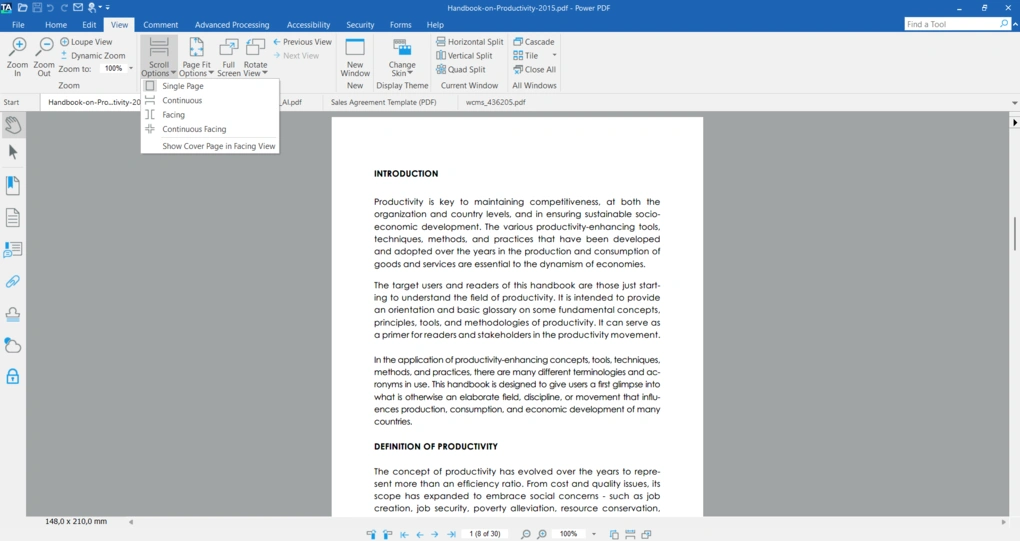
Tungsten Power PDF has solid PDF viewing features. You can also apply zoom, loupe view, and dynamic zoom view.
When it comes to the scroll options, you can choose from single page, continuous, facing, and continuous facing scrolling.
Furthermore, Tungsten Power PDF lets you use four skin types when reading your PDF files. However, to apply a new skin, you need to restart the software.
It’s also great that you have more layout options, including the option to split pages horizontally, vertically, or use a quad split.
PDF editor
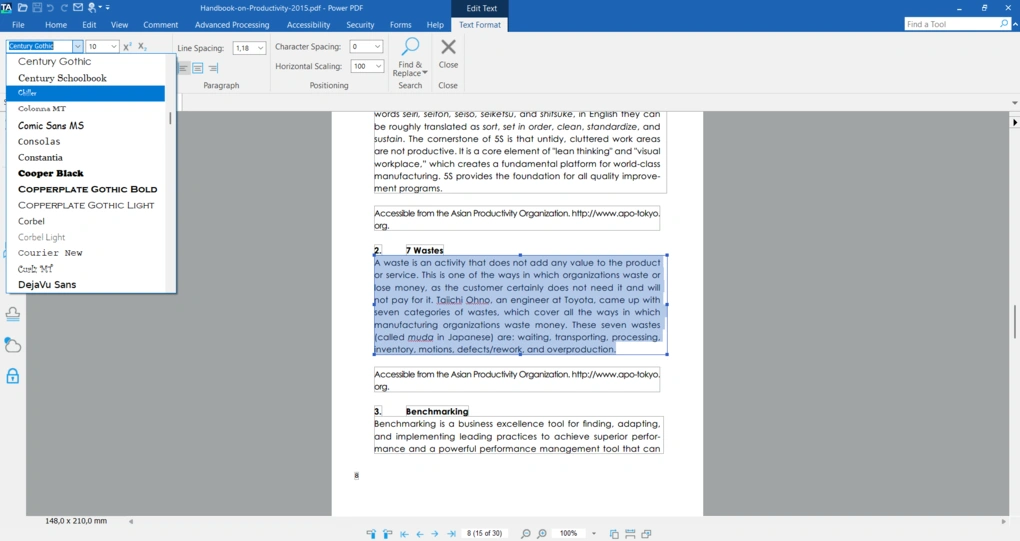
I was glad to see that you can easily select the text you want for editing. Tungsten Power PDF identifies blocks, and you can also select multiple text boxes for editing.
When editing text, Tungsten Power PDF offers numerous font types, sizes, and color options, as well as line spacing, character spacing, and more.
Moreover, you can add and edit images as well. That said, you can move them around, change their opacity, flip and rotate them, and arrange them.
In addition to adding and editing text and images, you can insert video files, links, sound, and 3D objects.
Overall, I was satisfied with the PDF editing features during my Tungsten Power PDF review.
Annotation tools
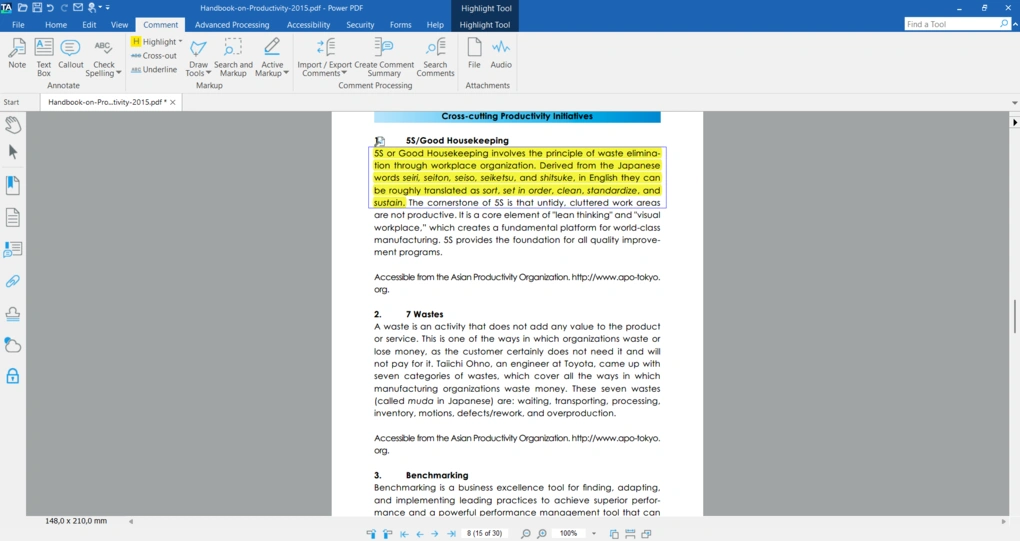
Since Tungsten Power PDF was primarily designed for business and enterprise use, I was curious how the annotation tools perform. Let’s take a closer look at them!
You can leave notes, callouts, text boxes, and place audio and other files as well. Besides, you can highlight sentences and areas. When highlighting, additional customization options appear that let you change the color, style, and opacity.
During my Tungsten Power PDF review, I discovered that you can export and import comments and create summaries from them. This is a valuable feature for teams to easily review comments.
Lastly, you can draw various shapes with Tungsten Power PDF if you want. Personally, I don’t regularly use this feature, but I can imagine that it could be useful for some of you.
PDF organization
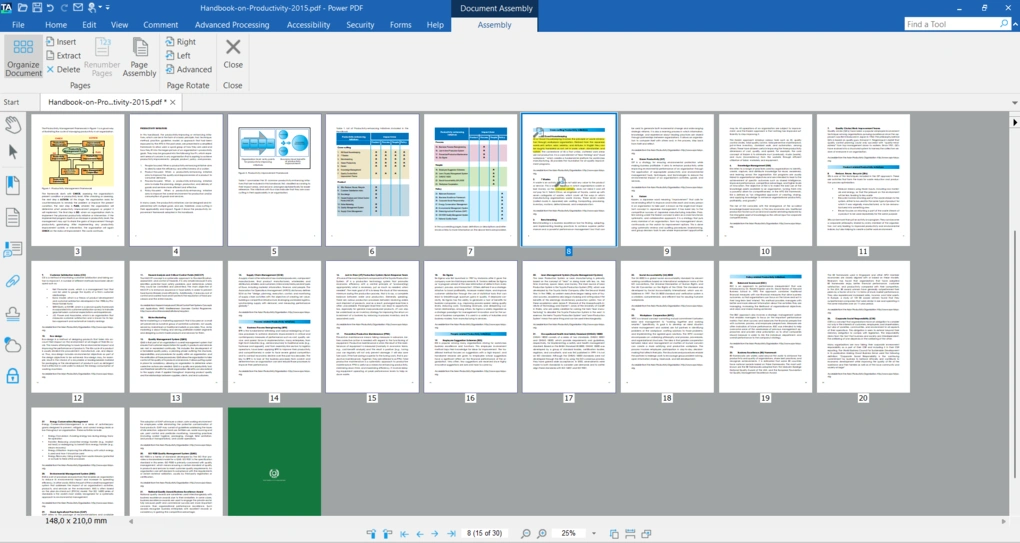
If you click on the “Document Assembly”, you can organize your PDF pages. You can change the order, rotate them, and delete or insert new pages.
To move the pages around, just drag and drop them to the place you want to add them.
Forms and electronic signatures
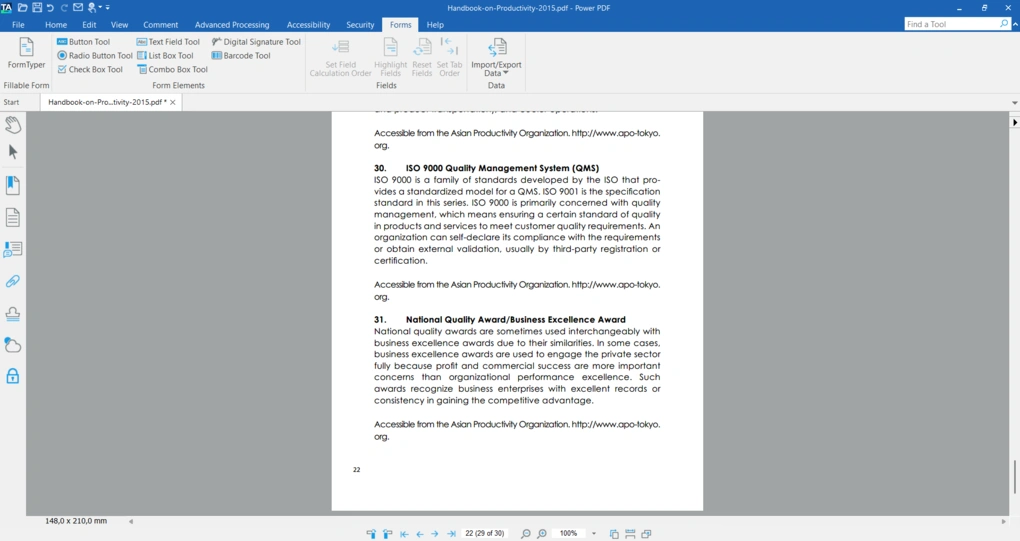
In terms of PDF form filing and creating, Tungsten Power PDF provides solid features. Using its form features, you can insert text boxes, lists, radio buttons, checkboxes, and more.
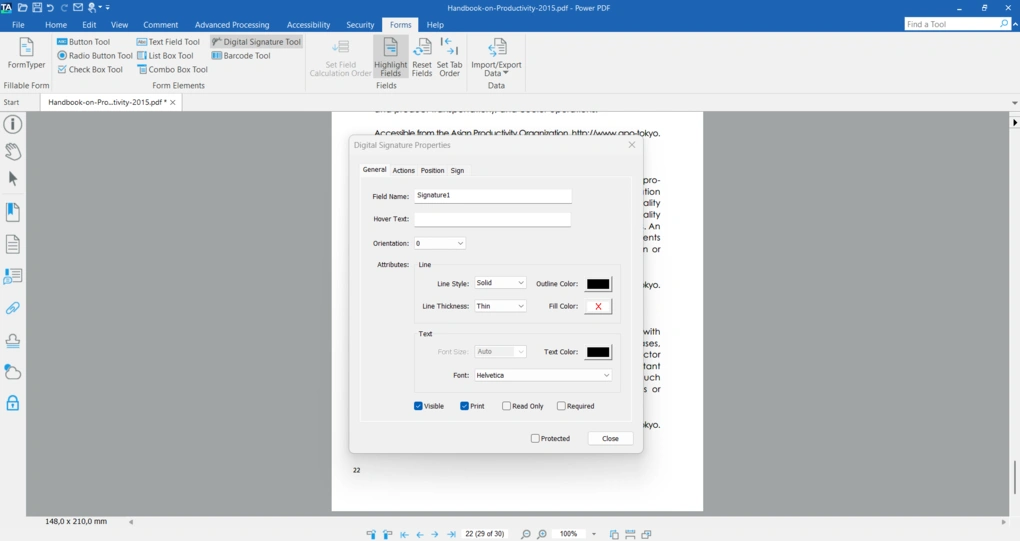
In addition, you can sign documents electronically with Tungsten Power PDF. It provides a digital signature to verify the authenticity, integrity, and non-repudiation of your PDF documents.
Similar to other PDF editors, you can draw, type, or insert your signature as an image. You can also choose different colors, and Tungsten Power PDF lets you create multiple signatures.
PDF security
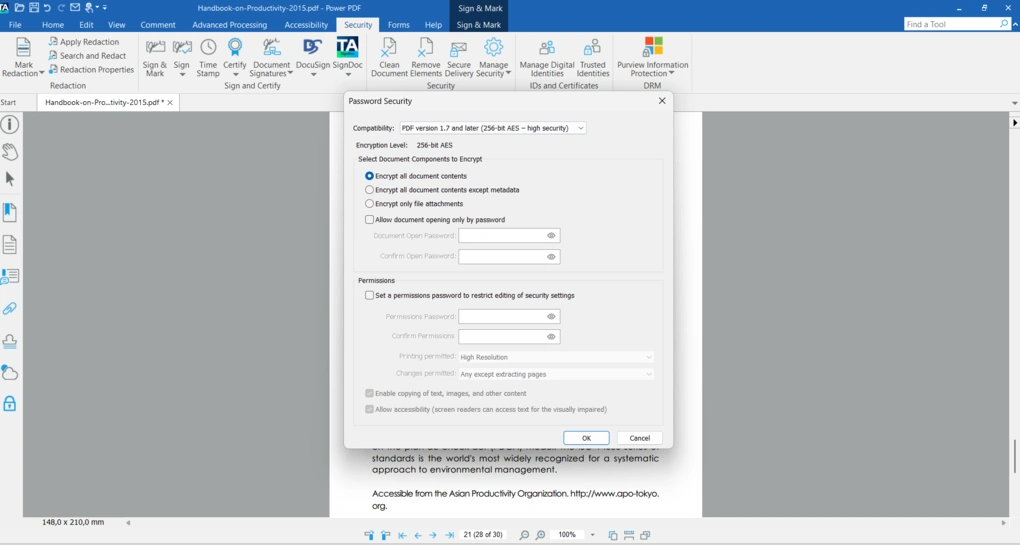
Tungsten Power PDF offers enterprise-grade security features. You can add password protection to your PDF documents if you click on “Manage Security”. It probably offers the most customization options for setting passwords and permissions.
You can encrypt different components in your PDF file or the whole document. Also, you can set whether it is enabled to print, make changes, and more.
During my Tungsten Power PDF review, I discovered that it offers top-notch PDF redaction features. You only need to mark the text you want to redact, and then click on “Apply Redaction”. Unlike many other PDF editors, it permanently removes the data, making it unrecoverable.
Finally, it has a “Search and Redact” feature that automatically finds and marks sensitive information throughout the document.
Conversion features
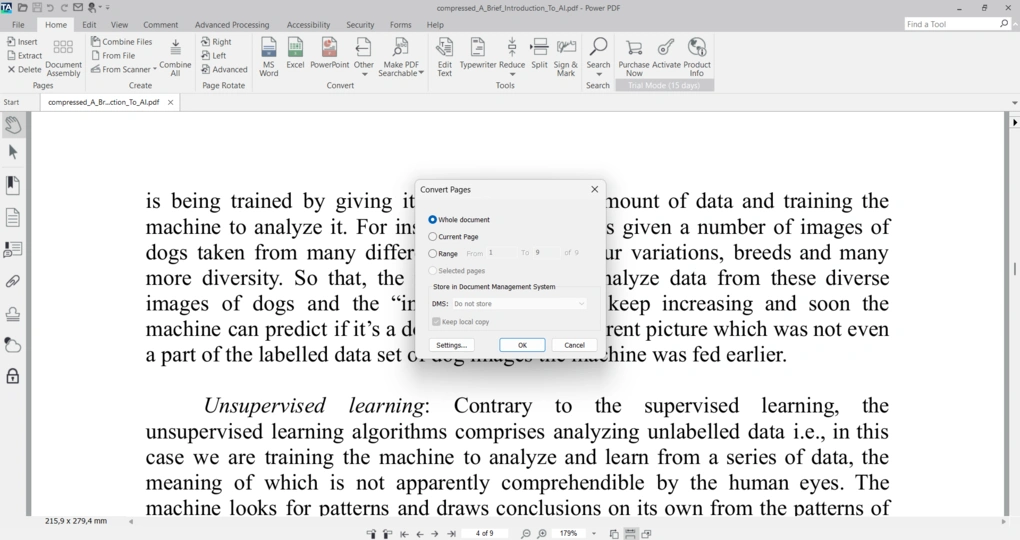
With Tungsten Power PDF, you can convert PDFs into Microsoft Word, Excel, PowerPoint, and XPS documents. The conversion takes 5-10 seconds, and you will get the content in another format.
While some users reported formatting issues when converting PDFs to other file types, I did not encounter any during my Tungsten Power PDF review.
Compressing tools
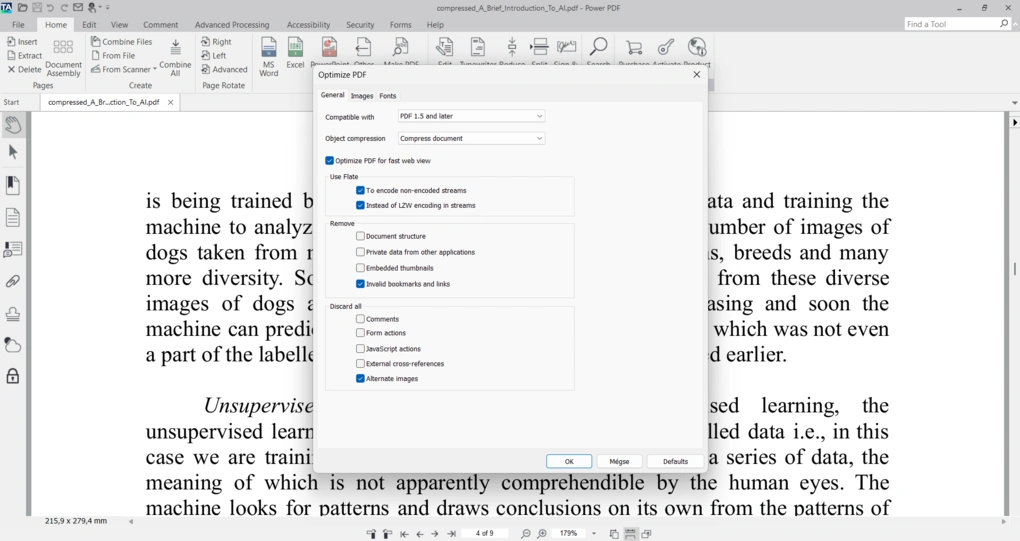
To compress PDF documents, go to the “Home” tab and click on “Reduce”. With this feature, you can compress or remove compression from your PDF files.
It is also highly customizable, allowing you to optimize the size of images in your PDF and more.
OCR
Tungsten Power PDF offers an OCR feature as well to turn scanned images into searchable and editable PDFs. It is powered by the OmniPage OCR engine.
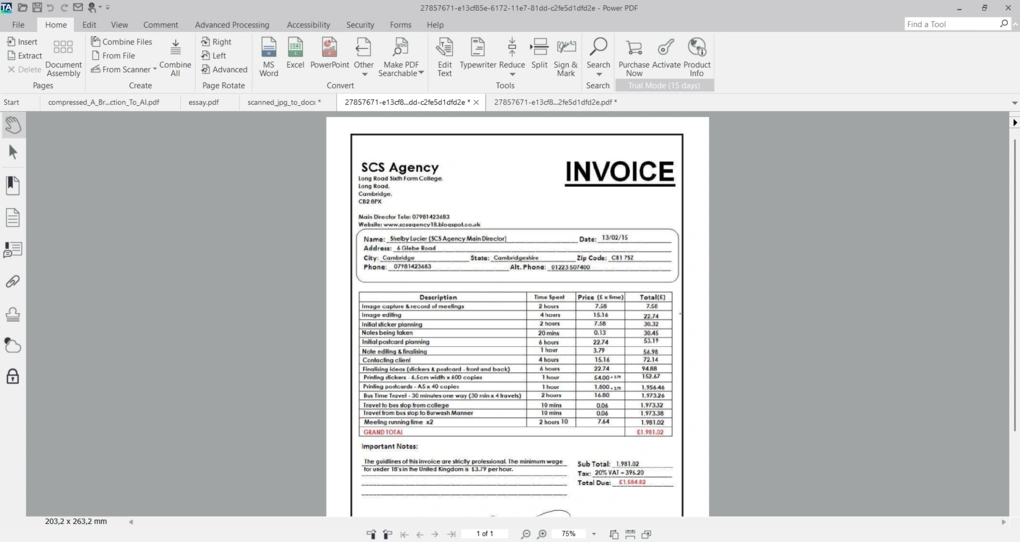
While the OCR is fast and accurate, I experienced that Tungsten Power PDF can’t handle forms or tables. For example, one time I used this picture for OCR:
And it provided me with this output:
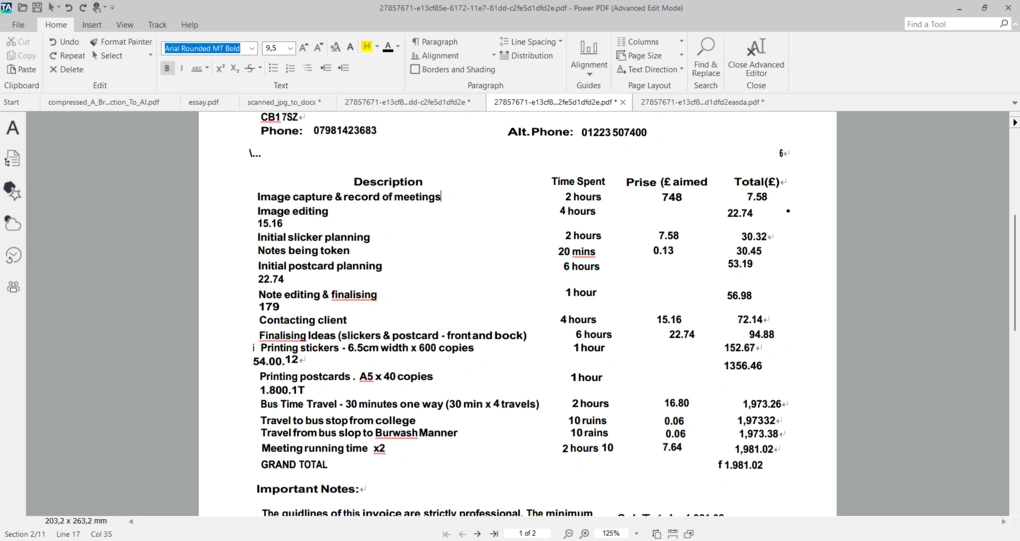
As you can see, it was accurate, but did not nail the structure of the document. Therefore, while Tungsten Power PDF’s OCR feature can be ideal for text-only images, it struggles with tables and other elements.
If you need more accurate OCR features, I get better results when testing ABBYY FineReader, EaseUS PDF Editor, and Tenorshare PDNob.
Check out my full list here: 6 Best OCR Software For 2026 | 30+ Personally Tested Tools
Explore our Apps directory
A curated directory of software tools we’ve independently reviewed, with links to full reviews, comparisons, and category guides.
Tungsten Power PDF user interface
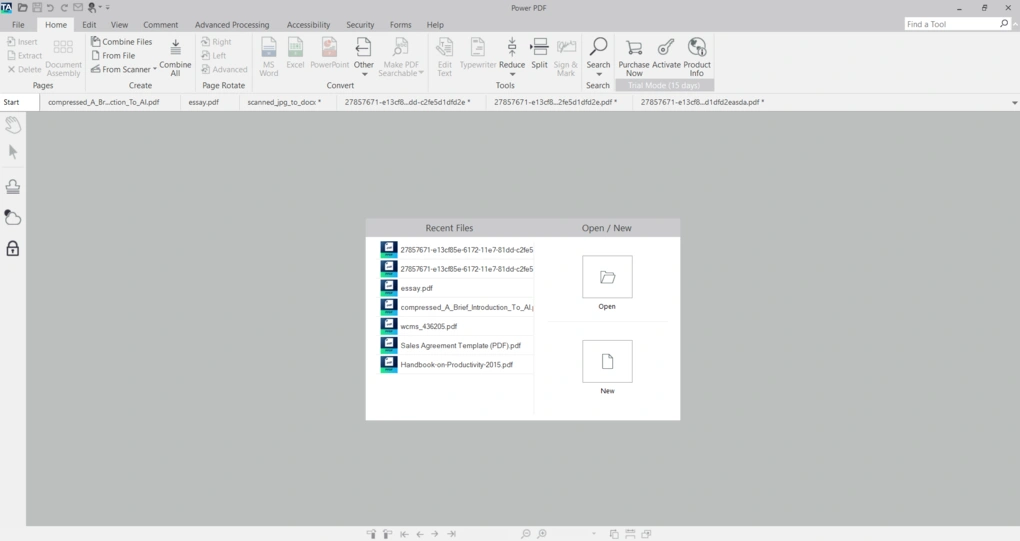
Tungsten Power PDF offers a Microsoft Word-like user interface, so despite its heavy feature set, you will have a short learning curve. Its user-friendly interface helps you find all the key functionalities you need, exactly where you would look first.
Tungsten Power PDF pricing
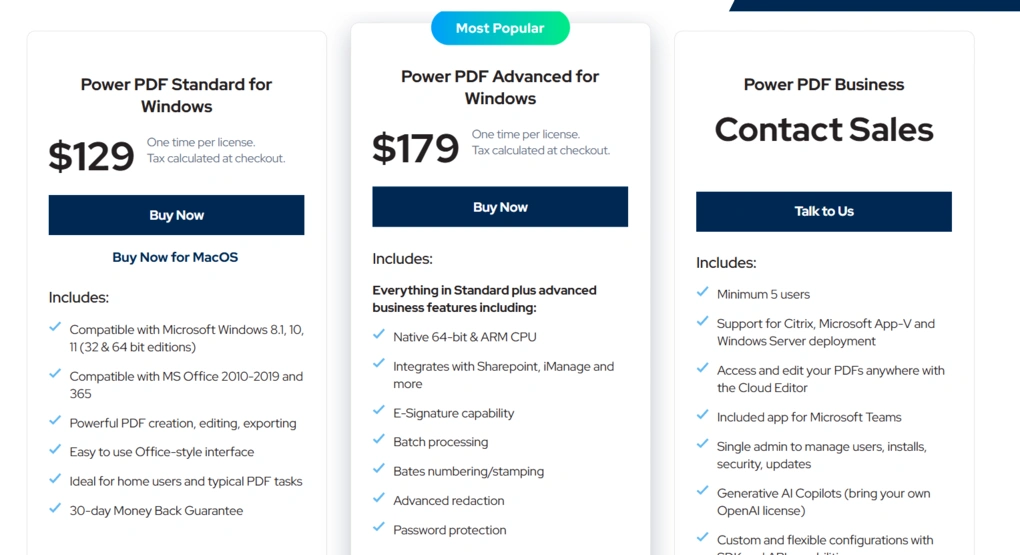
Tungsten Power PDF has three paid pricing plans and offers a 15-day free trial. However, Tungsten Power PDF does not have a permanently free plan or version.
Tungsten Power PDF is a one-time purchase, meaning users own the software forever after buying it. Also, it offers a 30-day money-back guarantee.
Power PDF Standard
The Standard version of Tungsten Power PDF for Windows or Mac costs $129. It includes all the key features, including advanced ones, and is ideal for professional and personal use.
If you decide to upgrade from Power PDF Standard to the Advanced license, you will need to pay the full price, since these products are sold separately.
Power PDF Advanced
The Advanced version of Tungsten Power PDF for Windows costs $179. The key difference between the Standard and Advanced plans is that the Advanced plan includes business features such as batch automation, shared comment synchronization between reviewers, and DocuSign integration.
Power PDF Business
Tungsten Power PDF offers a Business plan that includes a maintenance package for regular updates and extended technical support. It starts at five users, and covers features like Generative AI Copilots and custom and flexible configurations with SDK and API capabilities.
Tungsten Power PDF applies custom pricing here.
Tungsten Power PDF security
During my Tungsten Power PDF review, I did not identify any security risks. Furthermore, when I researched online to see what other users say about privacy, I found that it is a safe PDF software to use.
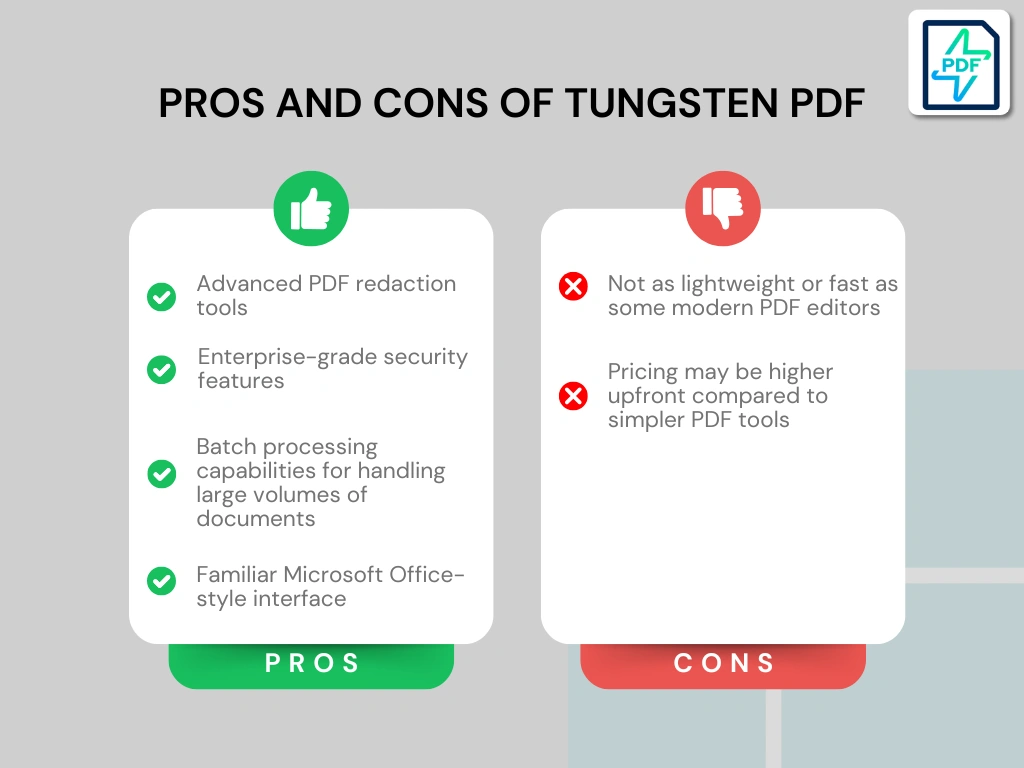
Pros and cons I discovered during my Tungsten Power PDF review
After my Tungsten Power PDF review, I found these pros and cons you should know about this PDF software.
Tungsten Power PDF’s pros
Tungsten Power PDF’s cons
Tungsten Power PDF alternatives
If you feel like Tungsten Power PDF is not the perfect one for you, here are the best alternatives:
|
App |
Best for |
Description |
|---|---|---|
|
Foxit |
Best affordable alternative to Adobe Acrobat |
A PDF editor with an intuitive user interface at an affordable price for Mac and Windows users. |
|
EaseUS PDF Editor |
Best all-in-one PDF editor for beginners |
It is an all-in-one PDF software to read, edit, annotate, and convert your documents. Full EaseUS PDF Editor review | Quick EaseUS PDF Editor overview |
|
Tenorshare PDNob |
Best for AI-powered PDF editing |
It is an easy-to-use AI-powered PDF editor that offers many features to edit, read, organize, and annotate your documents. Full Tenorshare PDNob review | Quick Tenorshare PDNob overview |
|
PDF Expert |
Best for Mac users |
A PDF editor for Mac, iPhone, and iPad users that offers all the tools you need to manage your PDF files, from annotation tools to signing PDFs. |
|
Xodo PDF Studio |
Best offline PDF editor |
A straightforward offline desktop PDF editor for Windows, Linux, and iOS devices, with great PDF reading and editing tools. Full Xodo PDF Studio review | Quick Xodo PDF Studio overview |
|
ONLYOFFICE PDF Editor |
Best for collaboration and team editing |
A versatile tool that combines PDF editing with document collaboration features. It lets you to edit text, add visual elements, and create fillable forms. |
|
UPDF |
Best value PDF editor with AI features |
One of my favorite PDF editors with advanced AI features and budget-friendly pricing. |
|
Nitro |
Best for business PDF workflows |
A feature-rich PDF editor with a strong focus on PDF editing. |
|
Smallpdf |
Best online PDF tool |
An online PDF software with numerous tools to convert, compress, and edit PDF files for free. |
|
Adobe Acrobat |
Most popular PDF editor |
The most popular PDF editor with solid features, but an extremely high price. |
|
pdfFiller |
Best for e-signatures and document workflows |
It offers a signing and editing solution that lets users sign and edit documents, send them for signature, and manage the full electronic document workflow in one place. |
|
LightPDF |
Best for AI PDF productivity |
An AI-powered PDF editor that lets you edit, convert, OCR, sign, annotate, chat with PDFs, and more. |
|
PDFgear |
Best free PDF editor |
A completely free, offline PDF editor with solid editing, OCR, conversion, and AI tools. |
|
PDF-XChange |
Best advanced PDF editor for Windows |
A powerful Windows-based PDF editor with advanced editing, annotation, security, and conversion tools. |
|
Sejda PDF Editor |
Best for simple, everyday PDF tasks |
An intuitive and simple PDF software best suited for personal use for those who need a PDF editor for basic PDF tasks. |
|
Soda PDF |
Best for security and file conversion |
A user-friendly PDF editor with solid core features, strong security tools, and broad file conversion options, but its advanced features come at a relatively high price. |
|
PDF Candy |
Best PDF toolkit with multiple tools |
A very practical PDF toolkit with a large number of useful tools, solid performance, and affordable pricing. |
|
ABBYY FineReader |
Best for OCR and document digitization |
A powerful OCR-focused PDF tool with strong layout detection, flexible conversion, and an efficient workflow. Full ABBYY FineReader review | Quick ABBYY FineReader overview |
|
PDFelement |
Best balance of features and ease of use |
An easy-to-use PDF editor with valuable features for a reasonable price. |
|
WPS Office |
Best easy-to-use office suite and PDF editor |
WPS Office is an easy-to-use office suite with solid PDF editing and AI-powered productivity tools, though its free plan is quite limited. |
Wrap-up: Tungsten Power PDF review
To summarize, I think Tungsten Power PDF is a top PDF editor and document management software for businesses.
However, if you need something lightweight or free for managing your PDF files, it’s not going to be a suitable PDF editor. But if you like the Office-style user interface and need robust features for your PDF workflows, I can recommend Tungsten Power PDF.
Related articles:
- The 8 Best Adobe Acrobat Alternatives: 30+ PDF Editors Tested
- The 10 Best PDF Editors In 2026 | 30+ Personally Tested PDF Tools
- The 6 Best PDF Readers For 2025 (Only FREE Options)
- 6 Best OCR Software For 2026 | 30+ Personally Tested Tools
- 6 Best PDF Converter For 2026 | 30+ Personally Tested Tools
Hope I was able to help you find the best PDF editor for you. As always, I will update this Tungsten Power PDF review over time so you guys have up-to-date information about this PDF software.
Looking for similar tools?
Visit our PDF editor library to explore other apps we’ve reviewed in this space and how they compare.
Why you can trust our reviews
At thebusinessdive.com, our team tests, reviews, and compares hundreds of productivity apps every year — from project management tools to note-taking apps. We dive deep into real-world use cases to help you find the right tools that actually improve your workflow, not just add noise.
Our mission? No fluff, no shortcuts—just honest, hands-on insights from productivity pros.
Discover how we stay transparent, read our review methodology, and let us know about any tools we missed.
Frequently asked questions
Is Tungsten Power PDF good?
Yes, it is a feature-rich PDF editor and document management platform for businesses. If you are looking for a powerful Adobe alternative, it can be an excellent choice based on my testing.
Is Tungsten Power PDF safe?
Yes, Tungsten Power PDF is safe. During my Tungsten Power PDF review, I did not identify any red flags about its safety and privacy.
Is Power PDF worth the cost?
If you need a powerful PDF editor for Windows, it is definitely worth the cost. Nonetheless, before you purchase any plans, make sure you choose the one you need, as you will pay the full price (again) if you upgrade.

Hey there! I am Aron, the founder of Thebusinessdive. I have been testing productivity apps for almost three years now. I reach 25.000 -50.000 people monthly with the mission to help you find the perfect productivity apps. Subscribe to my YouTube channel, newsletter, and social media to hear more about the best productivity tools. Let’s dive in!